
This year, the Lafourche Parish School District rolled out a new website for schools. It has many features valuable to our students, families, staff, and community members.
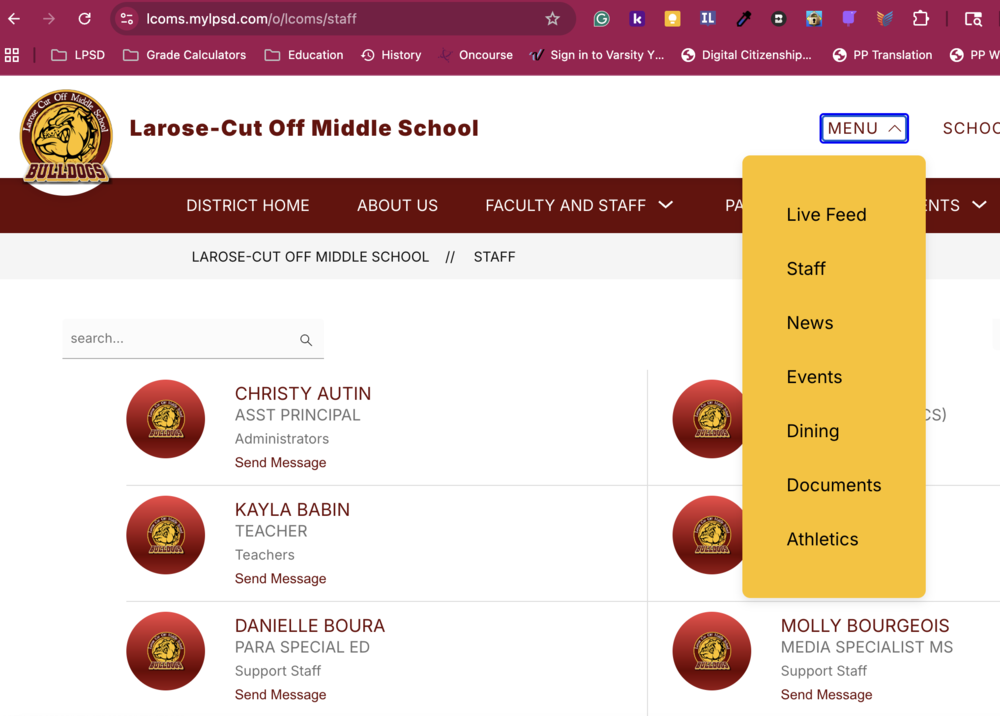
To send a message to an LCOMS staff member, you can visit the school's website https://lcoms.mylpsd.com/o/lcoms and click on the menu in the upper right-hand corner. A drop-down box will appear. Click "Staff," and you will be taken to a page that displays all staff members alphabetically. Click on "send message," and a box will pop up for you to compose a message to that staff member.
From the homepage, if you scroll down past the principal's message, you will see a section entitled "News." In this section, information and news about both the school and Lafourche Parish School District are posted.
To the right of the news is the Live Feed. Reminders and information are also posted in this section. Below the news section, there is a calendar of events. From the menu at the top, you can also click on "Events" and choose what month you would like to view. The LCOMS website is updated with information through the end of the school year.
If you know which section you want to go to directly, you can click on the menu button at the top of the page and choose a section from there. In the menu, you can click on dining and see what is coming up for lunch weekly or all month. On the right side of the dining page, make sure the drop-down says "all" if you want to view meals for the month.
If you have any questions regarding the website, please feel free to message Laurie Coleman from the staff menu.